Using native capabilities, Power Automate workflows, and targeted customization to create an operational governance platform.
For ISO 9001 compliant quality management systems, and document control in particular, the requirements are clear but the implementation path is wide open. Modern platforms like Microsoft 365 already solve most of the problem. SharePoint alone got us roughly 90 percent of the way there, but the remaining 10 percent required deliberate engineering to produce an ISO ready document control system.
ISO 9001 §7.5 defines the outcomes organizations must achieve, including version control, traceability, and controlled access, but leaves the implementation entirely up to the organization.
Rather than treating §7.5 as a paperwork exercise, we used it as a catalyst to better leverage the systems we already operate. Like source control in software engineering, versioning and controlled editing should simply be part of how work happens. That only works when the system is intentionally architected. Otherwise manual workarounds inevitably creep in and become liabilities when you can least afford them.
This approach led to a Microsoft 365 based document control system built on SharePoint, Power Automate approval workflows, and Word Quick Parts integrated with platform metadata. The result eliminated manual version tracking, parallel spreadsheets, and the audit preparation scramble that plagues many ISO implementations.
This article walks through how we approached the problem, what we built to close the remaining gaps in SharePoint, and what actually worked.
ISO 9001 §7.5: Clear Requirements, Flexible Implementation
Section 7.5 of ISO 9001 governs “Documented Information.” Its requirements are intentionally high-level. Organizations must ensure that documented information:
- Is identified and described appropriately (title, reference number, version, etc.)
- Is reviewed and approved for suitability and adequacy
- Is controlled through versioning and change management
- Is available where and when needed
- Is protected from unintended alteration
- Is retained and disposed of appropriately
The standard defines outcomes, not mechanisms. That’s by design — and the implementation choices you make here have a real impact on how well the system actually works.
Moving Beyond Paper-Era Patterns
Many ISO implementations still contain echoes of legacy patterns:
- Manually updated version tables in document footers
- Excel-based document control logs
- Static signature pages
- PDFs that simply replicate physical forms
These approaches can technically satisfy the requirement. However, they introduce duplication, administrative drag, and underutilize the capabilities available in modern cloud platforms such as SharePoint.
Rather than layering compliance on top of documents, we built governance directly into the platform architecture.
Design Principles
Our system was structured around five core principles:
- Single Source of Truth – The document library serves as the register. There are no parallel spreadsheets or shadow trackers.
- System-Controlled Metadata – Document IDs, version numbers, and related metadata are generated and synchronized by the platform, not manually entered.
- Inherent Auditability – Version history and approval actions create traceability automatically. Audit evidence is produced as a natural output of use.
- Workflow-Driven Governance – Approval states and change controls are enforced through structured automation, not informal convention.
- Natural Workflows – Teams work within the system as part of their normal process; governance occurs as a byproduct of execution.
This approach parallels modern source control in software engineering. Versioning and traceability are built into the architecture rather than layered on afterward. We applied the same philosophy to document control.
Platform Architecture: Leveraging Native Capabilities
We intentionally leveraged Microsoft 365 as an integrated ecosystem.
SharePoint provides:
- Major/minor versioning
- Structured metadata and views
- Permission controls
- Retention and preservation
- Search across governed content
Power Automate enables:
- Parameterized approval workflows
- Controlled state transitions (Draft → Pending → Approved)
- Structured capture of approval metadata
- Integrated routing through Teams and Outlook
SharePoint is not used as a file repository; it is deliberately configured and managed as a governance platform.
The Controlled Documents System in Practice
Structured, Transparent Library
Our Controlled Documents library functions as both repository and governance layer.
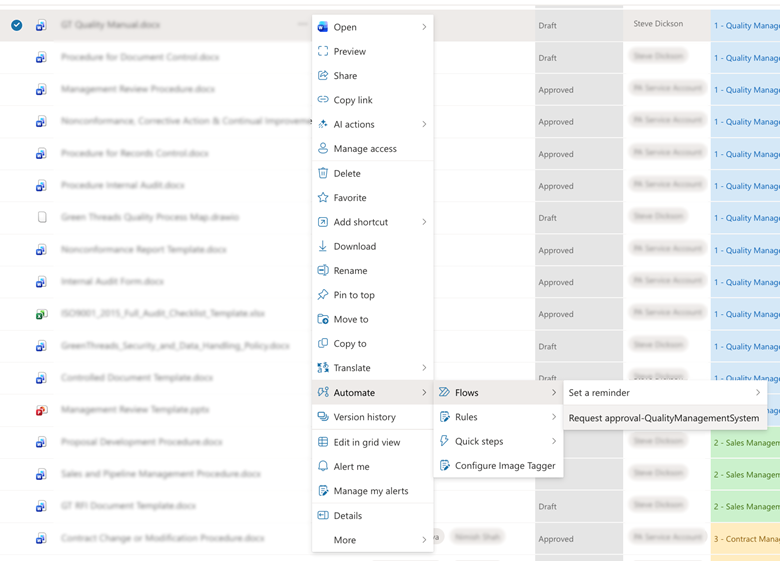
Metadata includes:
- Process Area
- Document ID
- Published Version
- Effective Date
- Next Review Date
- Sensitivity Classification
- Approval Status
- Last Approval Information
Leadership and process owners have real-time visibility into document status and lifecycle directly within the system, without the need for separate tracking reports or shadow registers.
System-Synchronized Document Identifiers
Document ID and Version fields are automatically synchronized into document footers using Word Quick Parts linked directly to SharePoint metadata.

This eliminates:
- Manual version tables
- Registry mismatches
- Parallel Excel tracking
- Administrative maintenance overhead
The platform, not the user, controls document identity and versioning.
Version History as Embedded Audit Trail
SharePoint’s version history provides inherent, system-level traceability.
- Major versions represent approved states
- Minor versions represent draft iterations
- Time-stamped changes are inherent
Audit evidence is produced as a direct output of routine system use, rather than reconstructed after the fact.
Where Native SharePoint Fell Short
One limitation we encountered: SharePoint’s built-in approval capability does not reliably preserve approval comments and decision context within version history.
Additionally:
- Approval metadata is surfaced primarily in document library columns rather than embedded within the version record
- Some approval data is visible only on published major versions
- Certain fields disappear when documents return to draft
- Comments are not consistently preserved alongside each version
For an ISO-controlled environment, this created a traceability gap.
Our Adjustment
We modified our custom approval workflow to write structured approval audit data into a dedicated metadata field (“Last Approval Information”).

This ensures the following remain durable and visible across lifecycle transitions:
- Approval decision
- Approver identity
- Timestamp
- Version number
- Comments
Governance data is captured automatically during workflow execution. It is not reconstructed after the fact.
Integrated Approval Workflows
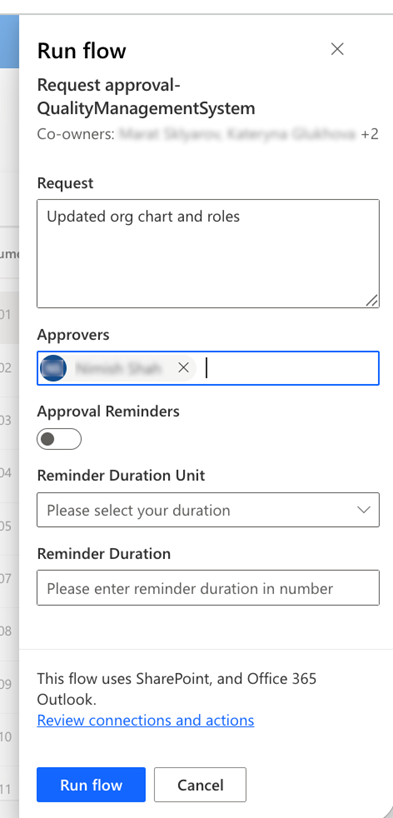
Approvals are initiated directly from the document context in SharePoint.
The workflow:
- Enforces structured routing logic
- Captures approver identity and decision comments
- Supports configurable reminders and escalation paths
- Integrates natively with Teams and Outlook
Approvers receive:
- Teams notifications
- Email notifications, with the ability to approve directly within Outlook; decisions update in real time across all reviewers’ threads
- OS-level notifications (if enabled)
- Centralized tracking and status visibility through the Approvals application
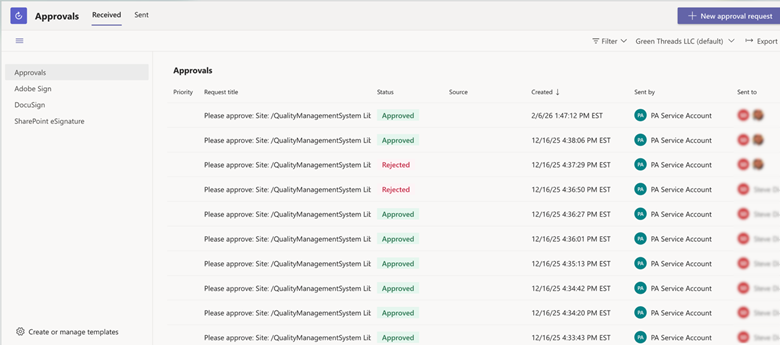
Review and approval for suitability and adequacy occur within the collaboration tools teams already use, eliminating parallel processes or external tracking.
Working Normally, Remaining Audit-Ready
The most meaningful outcome is what we no longer need:
- No separate document control spreadsheets
- No manual version tracking
- No artificial audit preparation
- No duplicated metadata maintenance
We operate within the system. The system enforces governance. Audit readiness becomes a continuous operating condition rather than a periodic exercise.
The system has been running well. What started as an ISO compliance requirement became something more useful: a governance architecture embedded directly into the tools we already use to run the business. Once the patterns were in place, extending them beyond document control became straightforward.